# Metamint Apps
Plug in. Power up. Grow easy.
- Site: https://metamintapps.com/
## 10 SEO tips for your shopify store
- Link: https://metamintapps.com/10-seo-tips-for-your-shopify-store/
- Published: 2026-11-13T18:00:29+00:00
- Author: Metamint Apps
The post [10 SEO tips for your shopify store](https://metamintapps.com/10-seo-tips-for-your-shopify-store/)
appeared first on [Metamint Apps](https://metamintapps.com).
## 10 support mistakes you are making, that is causing your dollars
- Link: https://metamintapps.com/10-support-mistakes-you-are-making-that-is-causing-your-dollars/
- Published: 2026-10-15T16:43:20+00:00
- Author: Metamint Apps
## Introduction
Customer support is a critical part of any business. Small missteps in how you handle
inquiries, resolve issues, and measure success can quietly drain revenue and frustrate
customers. This article outlines ten common support mistakes and practical ways
to fix them, so you can protect your bottom line and improve customer satisfaction.
## 1. Treating support as a cost center instead of a revenue enabler
When support is seen only as a required expense, it loses strategic importance.
Elevate it by tying success metrics to customer retention, repeat business, and
lifetime value.
## 2. Ignoring proactive outreach
Waiting for customers to come to you misses opportunities. Proactive check-ins,
educational content, and self-service options can reduce friction and prevent problems
before they start.
## 3. Overcomplicating self-service
Self-service should be clear and approachable. Too many options or tangled paths
lead to confusion. Aim for simple, searchable knowledge bases and concise troubleshooting
guides.
## 4. Inconsistent responses
Consistency in tone, terminology, and processes builds trust. Create standard responses
for common issues and maintain a unified knowledge base.
## 5. Slow response times
Speed matters in support. Set realistic response targets, automate where possible,
and escalate efficiently to reduce customer frustration.
## 6. Not measuring the right things
Track metrics that reflect impact on the customer journey, such as issue resolution
time, customer effort score, and repeat contact rates. Use insights to refine processes.
## 7. Poor handoffs between teams
Seamless collaboration between product, engineering, and support reduces back-and-
forth and speeds resolution. Document handoff procedures and ensure visibility across
teams.
## 8. Underutilizing available tools
Support platforms, ticketing systems, chat tools, and knowledge bases can automate
and streamline work. Invest time in setup and ongoing optimization.
## 9. Failing to solicit customer feedback
Regular feedback reveals gaps in the experience and highlights opportunities for
improvement. Make feedback easy and act on it.
## 10. Not closing the loop
Follow up after resolution to ensure the customer is satisfied and to prevent reopened
tickets. A simple closure process reinforces trust and accountability.
### Conclusion
Good support practices are not optional extras; they are essential to protecting
your revenue and building lasting relationships. By avoiding these ten mistakes
and continually refining your approach, you can turn support interactions into opportunities
for loyalty and growth.
The post [10 support mistakes you are making, that is causing your dollars](https://metamintapps.com/10-support-mistakes-you-are-making-that-is-causing-your-dollars/)
appeared first on [Metamint Apps](https://metamintapps.com).
## Configuring SEO on your Shopify Site
- Link: https://metamintapps.com/configuring-seo-on-your-shopify-site/
- Published: 2026-10-14T04:42:33+00:00
- Author: Metamint Apps
## Introduction to Shopify SEO
Search engine optimization (SEO) is essential for any e-commerce store looking to
attract organic traffic and boost sales. When running a Shopify site, configuring
your SEO settings correctly helps search engines crawl, index, and understand your
product catalog and store content.
## Optimizing Title Tags and Meta Descriptions
Start by fine-tuning the foundational metadata for your store. Shopify allows you
to set the homepage title and meta description directly in your online store preferences.
For products, collections, and blog posts, use the search engine listing preview
section at the bottom of each item’s page to customize clear, relevant titles and
descriptions that accurately reflect what you offer.
## Structuring Site Content and Navigation
Organizing your store logically benefits both shoppers and search engines. Group
items into distinct collections, use intuitive menu hierarchies, and keep internal
linking straightforward. Clean site navigation makes it easier for search engine
bots to discover all of your pages without encountering dead ends or convoluted
paths.
## Optimizing Product Images and Media
High-quality visuals are crucial for e-commerce, but large image files can slow
down page loading speeds. Compress product images before uploading to ensure quick
loading times. Additionally, write concise, descriptive alt text for every product
image to improve accessibility and provide search engines with context regarding
visual assets.
## Managing URLs and 301 Redirects
Shopify automatically generates clean URL structures for products, collections,
and pages. When updating URLs or retiring products, utilize Shopify’s built-in URL
redirect manager to set up 301 redirects. This preserves search ranking authority
and prevents visitors from encountering broken 404 links.
## Leveraging Shopify Blogging and Content Marketing
Publishing regular, informative blog posts helps target informational keywords relevant
to your niche. Address common customer queries, share product tutorials, and provide
industry tips to broaden your organic search reach and drive qualified visitors
to your catalog.
## Conclusion
Configuring SEO on your Shopify site is an ongoing effort that yields substantial
long-term benefits. By establishing proper metadata, structuring navigation, optimizing
media, and keeping content fresh, you create a solid foundation for sustainable
organic visibility and store growth.
The post [Configuring SEO on your Shopify Site](https://metamintapps.com/configuring-seo-on-your-shopify-site/)
appeared first on [Metamint Apps](https://metamintapps.com).
## How to Set Up a Dedicated Live Chat and Support Dashboard in WordPress
- Link: https://metamintapps.com/how-to-set-up-a-dedicated-live-chat-and-support-dashboard-in-wordpress/
- Published: 2026-10-07T05:00:14+00:00
- Author: Metamint Apps
# **The Operational Bottleneck of Fragmented Support Tools**
Managing customer support across disconnected tools—such as third-party chat widgets,
external ticket platforms, and separate WooCommerce order screens—creates operational
bottlenecks:
* Support teams waste time context-switching between software tools.
* Order lookup delays slow down live support resolution times.
* Third-party chat widgets add external JavaScript libraries that negatively impact
page speed performance scores.
Setting up a native live chat and support dashboard directly inside your WordPress
environment resolves these inefficiencies. Support teams gain access to real-time
communication tools and complete WooCommerce context within a single management
screen.
---
# **Technical Architecture Overview**
MetaMint Helpdesk builds a native support workspace within the WordPress admin environment
using modern web standards:
# **Implementation Walkthrough**
## **Step 1: Install MetaMint Helpdesk Base Platform**
1. Log into your **WordPress Admin Panel**.
2. Navigate to **Plugins > Add New > Upload Plugin**.
3. Select the metamint-helpdesk.zip package and click **Install Now**.
4. Activate the plugin upon completion.
## **Step 2: Configure Workspace Permissions**
Establish secure access permissions for your support staff:
1. Navigate to **MetaMint Helpdesk > Settings > User Roles**.
2. Assign the **Helpdesk Agent** role to appropriate user accounts.
3. Grant support agents full ticket management rights without exposing underlying
core site options, theme settings, or plugin management panels.
```wp-block-code
// MetaMint Access Control Configuration Example
$agent_role = add_role( 'helpdesk_agent', __( 'Support Agent' ), array(
'read' => true,
'view_helpdesk_tickets' => true,
'reply_helpdesk_tickets' => true,
'manage_woocommerce' => false, // Restrict structural admin rights
'switch_themes' => false,
) );
```
## **Step 3: Customize the Storefront Chat Widget**
Configure the visitor-facing chat widget:
1. Navigate to **MetaMint Helpdesk > Chat Widget Settings**.
2. Set workspace colors to match your brand design.
3. Configure target display rules (e.g., enable chat across all product pages, disable
during checkout steps).
4. Set automated offline messaging options for non-business hours.
## **Step 4: Enable AI Bot Automation Rules**
Integrate the **MetaMint AI Support Bot Addon** to assist agents during busy periods:
1. Open **MetaMint Helpdesk > Addons > AI Bot**.
2. Input your knowledge base documentation, product detail feeds, and store policy
documentation.
3. Set the AI Bot to answer standard questions (e.g., shipping windows, return policies)
while routing complex inquiries to human staff.
---
# **Agent Operational Workflow Analysis**
Once configured, your support team handles all customer interactions from a unified
workspace
This single-screen workflow reduces resolution times, eliminates application toggling,
and keeps customer order details immediately visible.
The post [How to Set Up a Dedicated Live Chat and Support Dashboard in WordPress](https://metamintapps.com/how-to-set-up-a-dedicated-live-chat-and-support-dashboard-in-wordpress/)
appeared first on [Metamint Apps](https://metamintapps.com).
## How to Add OpenGraph Meta Tags to Shopify Without Editing Theme Files
- Link: https://metamintapps.com/how-to-add-opengraph-meta-tags-to-shopify-without-editing-theme-files/
- Published: 2026-10-07T04:03:34+00:00
- Author: Metamint Apps
# **The Danger of Hardcoding OpenGraph Tags in Liquid**
OpenGraph (OG) meta tags inform platforms like Facebook, WhatsApp, LinkedIn, and
Slack how to render links shared from your online store. They specify the image,
title, and description displayed when a link is shared online.
```wp-block-code
```
Historically, adding custom OpenGraph tags to a Shopify store required editing your
theme’s snippet files (snippets/social-meta-tags.liquid) or pasting custom code
into layout/theme.liquid.
This legacy approach introduces significant technical risks:
1. **Theme Upgrade Conflicts:** Updating your Shopify theme overwrites manual code
modifications, erasing your custom metadata configurations.
2. **Syntax Errors:** Misplacing a single Liquid tag or failing to close an HTML tag
can break rendering across your storefront.
3. **Duplicate Metadata Conflicts:** Many modern Shopify themes include basic, unconfigurable
OpenGraph logic. Adding inline code often produces duplicate og:image or og:title
tags, confusing social media crawlers.
---
# **Step-by-Step Implementation Guide Using MetaMint SEO**
MetaMint SEO addresses these risks by using Shopify’s modern **Theme App Embed framework**.
You can configure custom, dynamic OpenGraph structures across all product, collection,
and blog pages without writing or editing theme code.
## **Step 1: Enable the MetaMint SEO Theme App Embed**
1. Open your **Shopify Admin** dashboard.
2. Navigate to **Online Store > Themes**.
3. Click **Customize** next to your active theme.
4. On the far left sidebar menu, click the **App Embeds** icon (the bottom tab).
5. Locate **MetaMint SEO** in the list and toggle the switch to **On**.
6. Click **Save** in the top right corner.
## **Step 2: Define Dynamic Fallback Templates**
1. Return to your Shopify Admin and open the **MetaMint SEO App Dashboard**.
2. Select **OpenGraph Settings**.
3. Establish default template structures for your store pages using dynamic variables:
4. * **Product Title Pattern:** [Product Title] – [Product Vendor] | [Store Name]
* **Product Description Pattern:** Buy [Product Title] for [Product Price]. [Product
Short Description]
* **Default Image:** Select a high-resolution, branded fallback image (1200 x
630 px) used whenever a specific page lacks a primary image.
## **Step 3: Set Up Specific Product Overrides**
1. Inside the **MetaMint SEO** dashboard, click **Resource Management > Products**.
2. Select any product that requires unique social sharing messaging.
3. Upload a dedicated **1200×630 pixel** OpenGraph image tailored for social sharing
networks.
4. Add custom preview titles and description text tailored specifically to social
audiences.
5. Click **Publish Overrides**.
# **Verifying Metadata Output**
After configuring your OpenGraph metadata, verify your tags using platform debugging
tools:
## **Facebook Sharing Debugger**
1. Navigate to the [Facebook Sharing Debugger](https://developers.facebook.com/tools/debug/).
2. Enter your product URL (e.g., https://yourdomain.com/products/sample-product).
3. Click **Debug**. If the page was previously scraped, click **Scrape Again** to
fetch your updated metadata.
## **Twitter / X Card Validator**
Validate that your metadata renders correctly on X by testing your link in the post
composer to verify card visual layout, title formatting, and thumbnail resolution.
The post [How to Add OpenGraph Meta Tags to Shopify Without Editing Theme Files](https://metamintapps.com/how-to-add-opengraph-meta-tags-to-shopify-without-editing-theme-files/)
appeared first on [Metamint Apps](https://metamintapps.com).
## Top Shopify SEO Apps for Custom Meta Tags & Social Sharing Cards in 2026
- Link: https://metamintapps.com/top-shopify-seo-apps-for-custom-meta-tags-social-sharing-cards-in-2026/
- Published: 2026-10-06T06:35:05+00:00
- Author: Metamint Apps
**The E-Commerce SEO Landscape in 2026**
Search engines and social media networks sit at the core of e-commerce discovery.
When potential customers share your products across social channels like WhatsApp,
X (formerly Twitter), LinkedIn, and Facebook, your preview card dictates your click-
through rate (CTR).
Similarly, custom meta titles and descriptions tailored to search engine intent
govern your organic rankings.
However, default Shopify themes offer limited control over structured metadata.
They often rely on automated dynamic fallbacks that generate poor social previews,
cropped images, and truncated search descriptions.
To address these limitations, merchants rely on specialized Shopify SEO applications.
Below is an evaluation of the leading Shopify SEO applications in 2026, comparing
technical features, site performance impact, and price-to-value ratios.
---
# **2026 Comprehensive App Comparison**
| **Application Name** | **Theme App Embed (Zero Code)** | **OpenGraph & Twitter Card Control** | **Metafield Mapping Support** | **Performance Impact (PageSpeed Score)** | **Pricing Model** |
| **MetaMint SEO** | **Yes (100% Clean)** | **Complete Customization** | **Native Integration** | **Zero Overhead (100/100)** | **Flat Monthly Rate** |
| Plug in SEO | Partial (Modifies Liquid) | Standard Templates | Limited | Minor Overhead (~92/100) | Tiered / Monthly |
| Booster SEO | No (Legacy Injections) | Automated Only | No | Moderate Impact (~85/100) | High Tiered |
| SEO Manager | Partial | Manual Per Page | Basic Metafields | Minor Overhead (~90/100) | Monthly Recurring |
---
# **Top 4 Shopify SEO Applications Analyzed**
## **1. MetaMint SEO**
MetaMint SEO is a modern metadata management application built for high-growth e-
commerce stores. Built entirely on **Shopify’s Theme App Embed framework**, MetaMint
SEO injects precise, highly customizable meta tags and OpenGraph image mappings
without adding code directly to your underlying .liquid files.
* **Key Strengths:** Real-time social preview rendering, native integration with
Shopify Metafields, bulk dynamic metadata overrides, zero theme file modification,
and lightweight performance footprint.
* **Ideal For:** Merchants who want complete control over how their products appear
on Google and social media platforms without slowing down site performance or
breaking theme updates.
## **2. Plug in SEO**
Plug in SEO remains a well-known option in the Shopify ecosystem. It provides structured
site audits along with basic structured data updates.
* **Key Strengths:** Automated broken link checks and structured data templates.
* **Limitations:** The interface relies on older styling, and setup requires modifying
theme files, which can complicate future theme updates.
## **3. Booster SEO**
Booster SEO focuses on automated adjustments for store owners looking for a hands-
off approach.
* **Key Strengths:** Automated alt-text generation and bulk meta tag updates.
* **Limitations:** Automated tag adjustments can occasionally overwrite specialized
product titles, and subscription tiers scale steeply as inventory grows.
## **4. SEO Manager**
SEO Manager offers comprehensive control over error logging, 401 redirects, and
basic meta tag adjustments.
* **Key Strengths:** Robust 404 tracking and integrated redirect tools.
* **Limitations:** Lacks modern theme app embed support, requiring manual script
management when updating theme templates.
---
# **Strategic Evaluation Criteria for Merchants**
When selecting a metadata and social card optimization engine for Shopify, evaluate
these three core pillars:
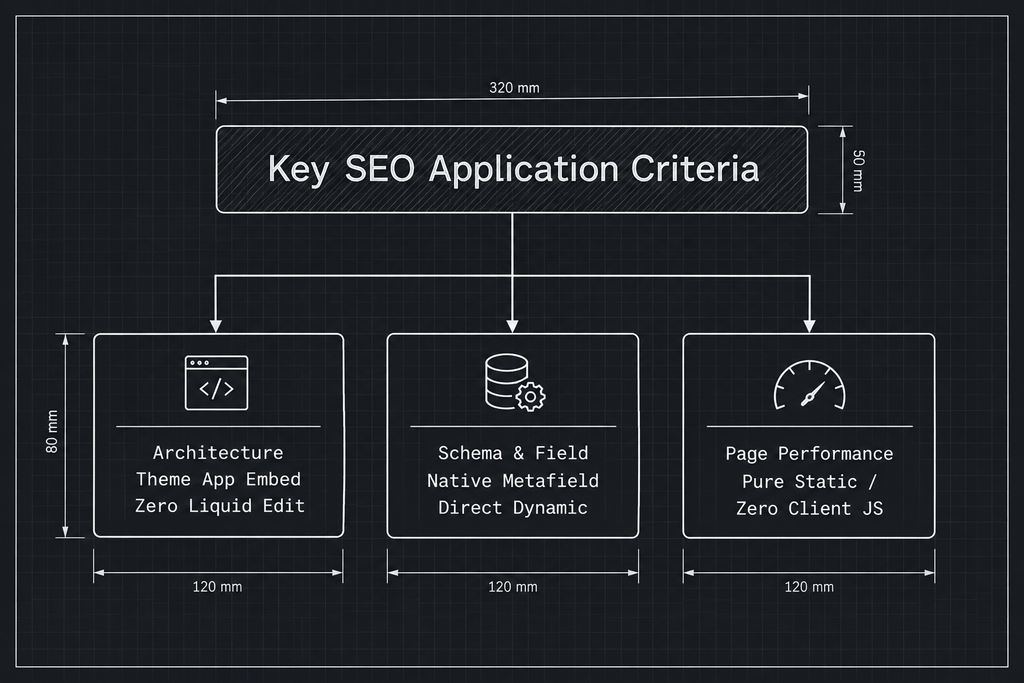
## **Modern Architecture (Theme App Embeds vs. Legacy Liquid Edits)**
Legacy SEO applications edit your theme’s theme.liquid template directly. When you
update your theme or switch designs, these code modifications often break, resulting
in duplicate meta tags, broken layouts, or lost SEO data. Modern solutions like
MetaMint SEO use Theme App Embeds, allowing you to safely toggle app functionality
on and off without leaving residual code in your theme.
## **Deep Integration with Shopify Metafields**
Modern Shopify setups rely on Custom Fields (Metafields) to store specialized product
attributes like designer names, material composition, custom sizing specs, and secondary
images. Your SEO application must read these metafields natively and render them
within your meta titles, descriptions, and OpenGraph parameters.
## **Impact on Site Speed and Performance**
Google’s Core Web Vitals prioritize fast page load speeds. Search engine optimization
applications should not run heavy JavaScript assets on the client browser. MetaMint
SEO renders structured metadata tags server-side on Shopify’s Edge Network, delivering
optimized preview data without impacting site speed or user experience.
The post [Top Shopify SEO Apps for Custom Meta Tags & Social Sharing Cards in 2026](https://metamintapps.com/top-shopify-seo-apps-for-custom-meta-tags-social-sharing-cards-in-2026/)
appeared first on [Metamint Apps](https://metamintapps.com).
## Why Moving from SaaS Support Tools (Zendesk/Freshdesk) to a Native WordPress Helpdesk Saves You Thousands
- Link: https://metamintapps.com/why-moving-from-saas-support-tools-zendesk-freshdesk-to-a-native-wordpress-helpdesk-saves-you-thousands/
- Published: 2026-10-06T06:32:55+00:00
- Author: Metamint Apps
Managing customer support for a growing WordPress or WooCommerce business often
leads store owners down a predictable path: signing up for third-party SaaS platforms
like Zendesk or Freshdesk. While these platforms offer robust ticketing features,
they come with a major hidden downside: **per-agent monthly fees that skyrocket
as your team expands.**
### The SaaS Pricing Trap: Per-Agent Billing
Most external helpdesks charge anywhere from $19 to $115 per agent per month. For
a modest support team of 5 agents, you could easily spend between $1,200 and $6,900
per year just to answer customer messages.
When you add secondary tiers for live chat features, advanced reporting, or external
API access, the costs compound quickly.
# **Direct Cost Comparison Analysis**
To understand the financial benefits of switching from cloud-hosted SaaS tickets
to a native WordPress architecture, consider this three-year total cost of ownership(
TCO) breakdown:
| **Platform** | **Team Size** | **Base Monthly Cost per Agent** | **Advanced Addons (AI, Omnichannel)** | **Total Year 1 Cost** | **3-Year Projected TCO** |
| **Zendesk Suite ** | 10 Agents | $55 / month | $50 / month / agent | $12,600+ | $37,800+ |
| **Freshdesk Enterprise** | 10 Agents | $55 / month | $29 / month / agent | $10,080+ | $30,240 |
| **Gorgias Advanced** | 10 Agents | Tiered by ticket volume | Tiered overages | ~$10,800 | ~$32,400 |
| **MetaMint Helpdesk (Native WP)** | **Unlimited** | **$0 / agent** (Single Annual License) | Built-in / Flat Addons | **$129** + $8/month for ChatGPT or $5/month for Gemini | **$447 – $1,497** |
### The Benefits of a Native WordPress Helpdesk
Switching to an in-house helpdesk built directly into WordPress, such as **Metamint
Helpdesk** fundamentally changes your cost structure and data ownership:
1. **Zero Per-Seat Fees:** Pay once for your plugin or addon license. Add as many
support staff or managers as needed without increasing software costs.
2. **Unified Data & Security:** Customer interactions stay in your own WordPress database.
There is no need to sync sensitive data across third-party cloud servers.
3. **AES-256 Encrypted Credentials Vault:** Standard SaaS platforms store site credentials
in plain text or third-party notes. Metamint Helpdesk includes a built-in Credentials
Vault that encrypts sensitive customer access details using AES-256-CBC directly
within your site.
4. **Seamless Admin Workflow:** Agents handle support requests within the familiar
WordPress WP-Admin panel without switching context between separate SaaS logins.
# **Technical & Operational Advantages of Native Architecture**
## **1. Eliminating API Rate Limits & Context Switching**
When your support team works inside an external SaaS dashboard, every customer lookup
requires an external API call to fetch WooCommerce customer histories, order logs,
or tracking statuses.
SaaS platforms impose API rate limits that throttle data syncs during peak sale
events like Black Friday.
A native solution like MetaMint Helpdesk operates directly inside the MySQL/MariaDB
database of your WordPress environment. Database queries execute locally, eliminating
latency, avoiding API throttling, and keeping your agents focused in a single dashboard.
## **2. Complete Data Ownership & GDPR Compliance**
Cloud-hosted helpdesks store sensitive customer details, order histories, and private
communication logs on external, shared servers. This setup introduces potential
security risks and complicated compliance challenges under regulations like GDPR,
CCPA, and HIPAA.
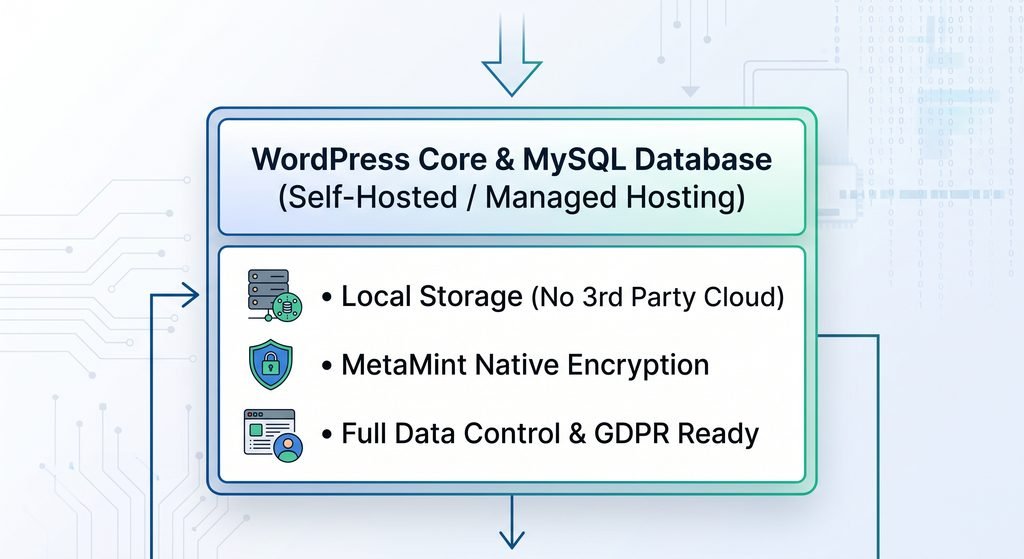
When you deploy a native helpdesk:
* Data stays on your secure, designated server infrastructure.
* No third-party SaaS provider can inspect, mine, or train models on your private
customer interactions.
* Database backups include your support ticket history alongside core web records.
---
# **Functional Breakdown: MetaMint Helpdesk Capabilities**
MetaMint Helpdesk is designed to match high-tier SaaS platforms while running on
self-hosted WordPress infrastructure:
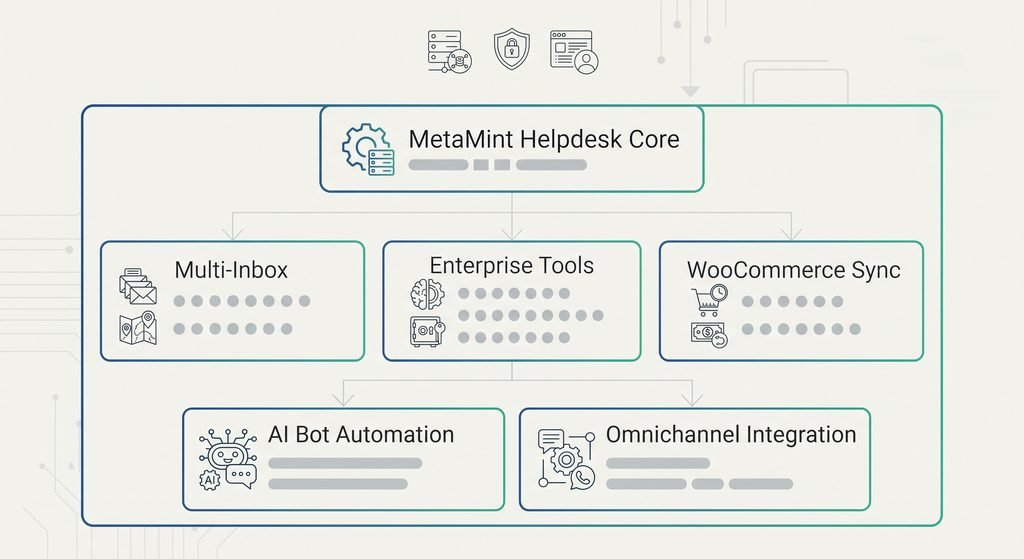
## **Advanced Features Summary**
* **Multi-Inbox Management:** Consolidate support inquiries from multiple web properties
and email accounts into a single, organized admin panel.
* **WooCommerce Integration:** View customer purchases, update order statuses,
trace delivery tracking, and process refunds directly from the ticket view.
* **Credentials Vault:** Safely receive, encrypt, and store sensitive login credentials
provided by customers for technical support, automatically purging them upon
ticket closure.
* **Canned Replies & Automation Rules:** Speed up support workflows by configuring
reusable template responses and automated routing rules based on keywords, order
status, or customer tags.
* **Omnichannel Communication (Slack, Discord, WhatsApp):** Send real-time notifications
and manage incoming tickets through your team’s preferred messaging applications.
* **AI Support Bot Addon:** Automatically answer common inquiries, parse site knowledge
bases, and resolve standard support tickets without requiring human intervention.
### Scaling Productivity with Metamint Helpdesk Addon
To match high-end SaaS features without paying SaaS prices, the **Metamint Helpdesk
Addon** unlocks enterprise-grade workflows directly inside WordPress:
* **AI Bot:** Automatically resolve repetitive questions using custom knowledge
bases and chat streaming.
* **Multi-Inbox Management:** Connect unlimited support email addresses via IMAP/
SMTP into a central dashboard.
* **Team Channels (Slack & Discord):** Instant notifications and thread synchronization
keep your team informed without per-seat licensing fees.
**Takeaway:** Moving support back inside WordPress gives you full control of customer
data, keeps site operations streamlined, and frees up thousands of dollars annually.
The post [Why Moving from SaaS Support Tools (Zendesk/Freshdesk) to a Native WordPress Helpdesk Saves You Thousands](https://metamintapps.com/why-moving-from-saas-support-tools-zendesk-freshdesk-to-a-native-wordpress-helpdesk-saves-you-thousands/)
appeared first on [Metamint Apps](https://metamintapps.com).