














Connect Metamint Helpdesk with 8,000+ Apps via Zapier
Automate your customer support workflows without writing a single line of code. Sync tickets, replies, status changes, and user records between WordPress and thousands of third-party tools using native Zapier triggers and actions.
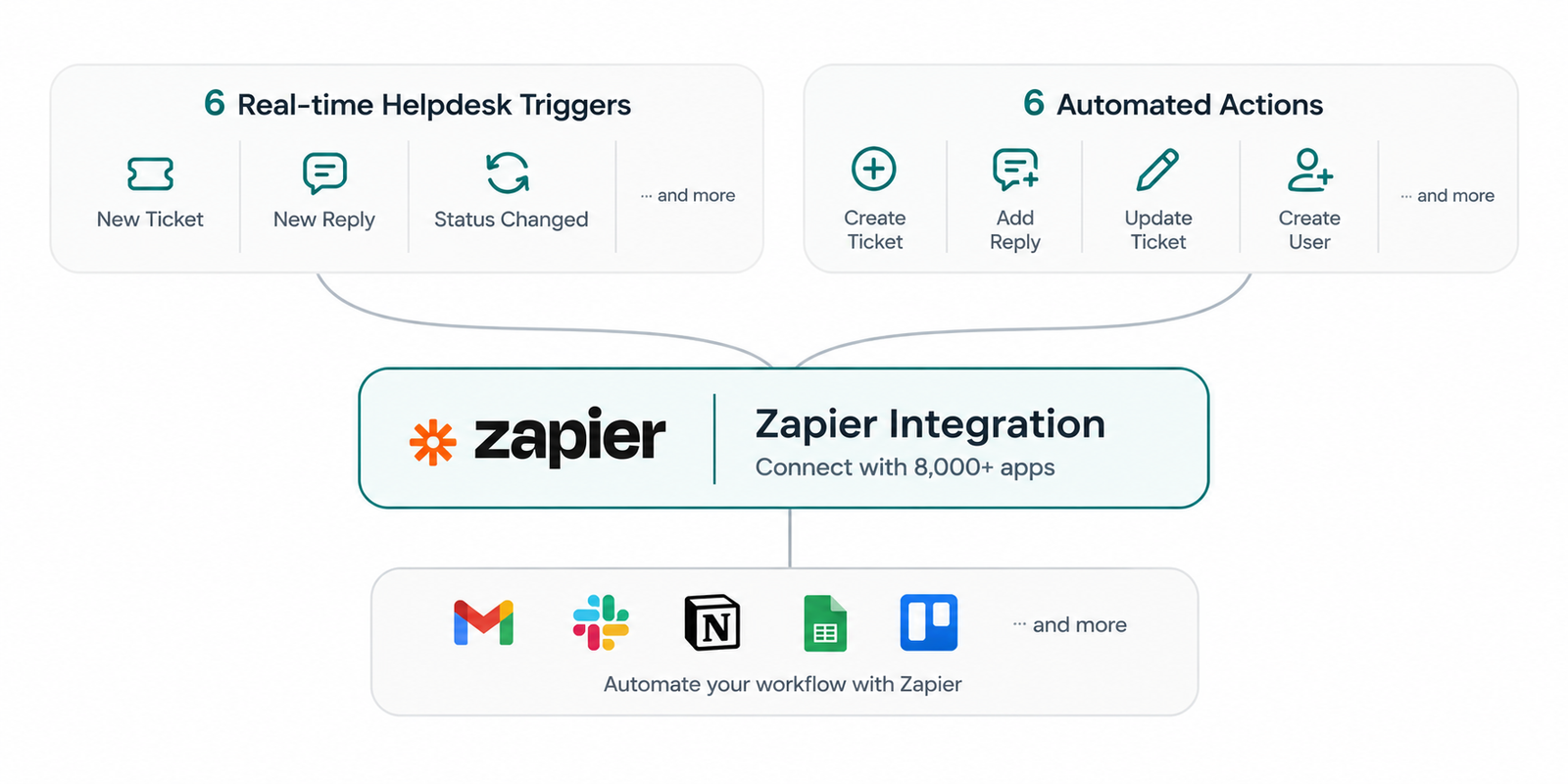
What is the Metamint Helpdesk Zapier Integration Addon?
Core Features & Capabilities
Build Custom Support Automations Across Your Entire Tech Stack
Eliminate manual data entry and connect WordPress support tickets with your CRM, spreadsheets, project management boards, and documentation tools.

No-Code Workflow Automation

6 Native Helpdesk Triggers

6 Automated Helpdesk Actions

One-Click API Key Authentication

Works on Free Zapier Plans
Triggers & Actions Reference Matrix
Supported Zapier Triggers & Actions
Automate two-way data flows between Metamint Helpdesk
and your connected apps
Triggers (Metamint Helpdesk → Zapier)
| Trigger | When It Fires |
|---|---|
| New Ticket | Fires whenever a new support ticket is created in Metamint Helpdesk. |
| New Reply | Fires whenever a new customer or agent reply is added to a ticket. |
| Status Changed | Fires whenever an existing ticket’s status is updated. |
| New User | Fires whenever a new WordPress user account is created. |
| Deleted Ticket | Fires when a support ticket is permanently deleted. |
| Deleted User | Fires when a WordPress user account is permanently deleted. |
Actions (Zapier → Metamint Helpdesk)
| Action | What It Does | Required Fields |
|---|---|---|
| Create Ticket | Automatically opens a new support ticket in WordPress. | title, customer_email |
| Add Reply | Posts a new reply onto an existing support ticket. | ticket_id, message |
| Update Ticket | Changes ticket status (open, in-progress, closed) and optionally adds a note. | ticket_id, status |
| Create User | Creates a new WordPress user account with a specified role. | |
| Delete User | Permanently removes a WordPress user account. | user_id |
| Delete Ticket | Permanently deletes a support ticket. | ticket_id |
Real-World Workflow Examples
Popular Ways Teams Automate Metamint Helpdesk with Zapier
How to Connect Metamint Helpdesk to Zapier
Get your first automated workflow running in under five minutes
Addons, ensure your Addons license is active, and toggle Zapier Integration to Active.
Open Metamint Helpdesk → Settings → Zapier and copy both your Site URL and your generated API Key.
Log in to Zapier, create a new Zap, and search for the integration in the Zapier app directory.
Paste your Site URL and API Key when prompted by Zapier to link your WordPress helpdesk.
Choose your trigger event, map your fields to an action step, test your Zap, and turn it on.
Activate the Addon
Addons, ensure your Addons license is active, and toggle Zapier Integration to Active.
Copy Your Site URL & API Key
Open Metamint Helpdesk → Settings → Zapier and copy both your Site URL and your generated API Key.
Add the App in Zapier
Log in to Zapier, create a new Zap, and search for the integration in the Zapier app directory.
Authenticate Your Site
Paste your Site URL and API Key when prompted by Zapier to link your WordPress helpdesk.
Select Triggers & Actions
Choose your trigger event, map your fields to an action step, test your Zap, and turn it on.
FAQ
Asked, answered
Activate the Zapier addon, navigate to Metamint Helpdesk -> Settings -> Zapier, and copy your Site URL and API Key. In Zapier, select the official app, paste your Site URL and API Key to authenticate, and start building automated Zaps.
Metamint Helpdesk provides 6 triggers for Zapier: New Ticket, New Reply, Status Changed, New User, Deleted Ticket, and Deleted User.
Zapier workflows can trigger 6 actions in Metamint Helpdesk: Create Ticket, Add Reply, Update Ticket (change status to open, in-progress, or closed and optionally add a note), Create User, Delete User, and Delete Ticket.
Clicking Regenerate in Settings -> Zapier immediately creates a new API key and invalidates the previous one. Any active Zaps using the old key will need to be updated with the newly generated key.
You do not need to buy individual addons separately. A single Metamint Helpdesk Addons license purchase gives you full access to all addons—including Zapier Integration—and you can simply activate the ones you want to use from your WordPress dashboard.
Automate Repetitive Support Tasks Across 8,000+ Apps
Connect Metamint Helpdesk to Zapier today and let automated workflows handle ticket creation, status updates, and cross-app syncing while your team focuses on customers.
Get Metamint Helpdesk Addons